Requirements and traceability
From requirement to defect in one view
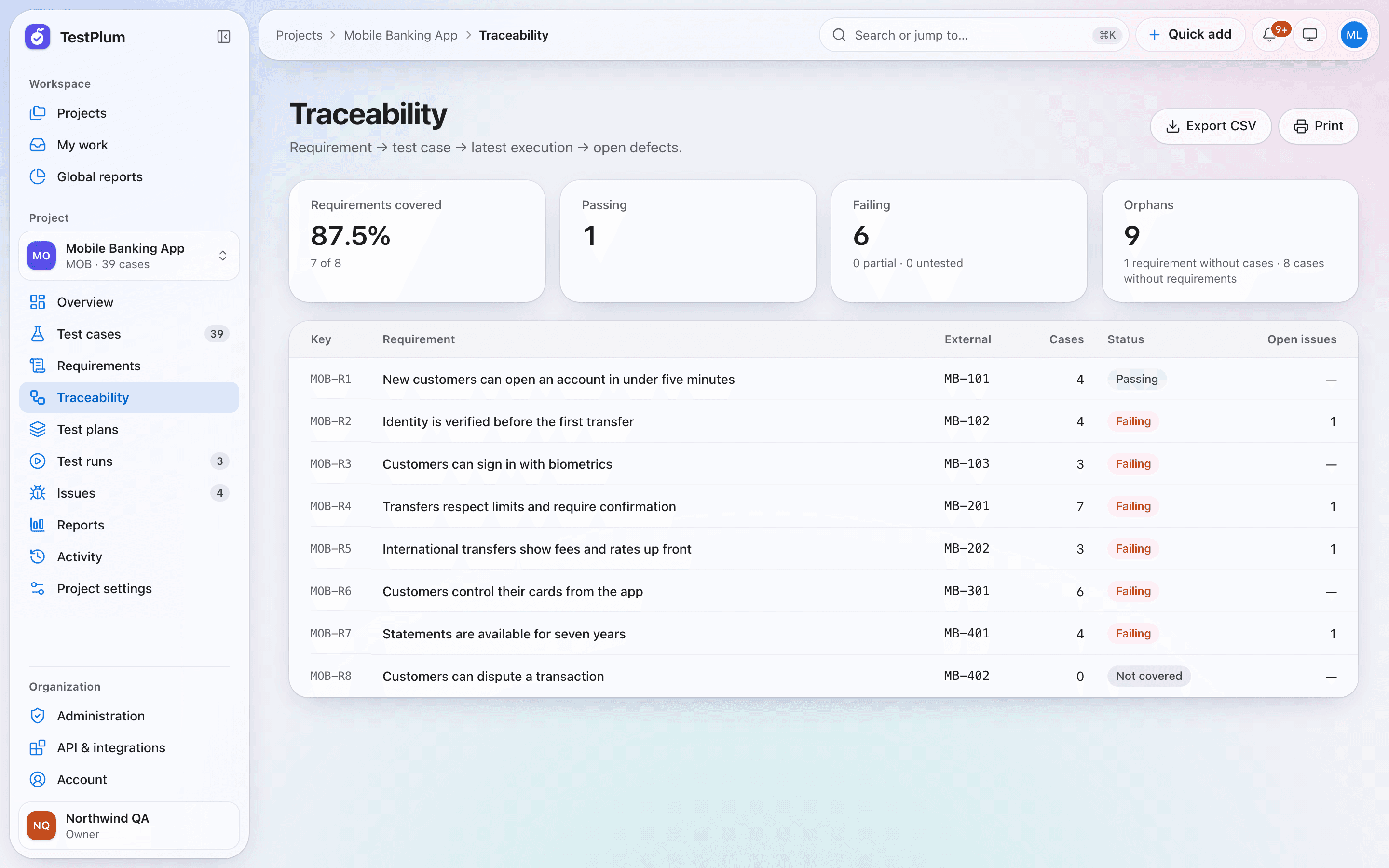
TestPlum's traceability matrix links each requirement to its test cases, the latest execution of each case and any open defects. Every requirement gets a status computed from recorded results — passing, failing, partial, untested or not covered — and the matrix highlights orphans: requirements without cases and cases without requirements.
What you can do
Requirement coverage, derived status, orphan detection and an exportable traceability matrix.
Requirements with acceptance criteria
Store requirements with an external ID from your tracker, acceptance criteria and tags, and link them to the cases that verify them.
Status from evidence
A requirement is failing if any linked case's latest result failed or was blocked, passing if all passed, and not covered if it has no cases at all.
Orphan detection
See requirements no test covers and test cases that verify no requirement, so gaps surface before an audit does.
Coverage you can export
Export the matrix to CSV or print it for sign-off. Coverage is the share of live requirements with at least one live linked case.
How it works
Add requirements
Create them by hand or import them with their external IDs.
Link test cases
Link one requirement to many cases and one case to many requirements.
Execute
Every result updates the requirement's status automatically.
Review the matrix
Filter failing and uncovered requirements and follow each one to its defects.
Requirements and traceability: frequently asked questions
What is a requirements traceability matrix?
A requirements traceability matrix is a table that maps each requirement to the tests that verify it and to their results and defects. It shows which requirements are covered, which are failing and which have no tests.
How does TestPlum calculate requirement coverage?
Requirement coverage is the number of live requirements with at least one live linked test case, divided by the number of live requirements.
More of TestPlum
Test case management
Structured steps, versions with diffs, templates, custom fields, saved views and CSV import/export.
Learn moreTest runs and execution
Run snapshots, assignment, step results with keyboard shortcuts, append-only history, burndown and retests.
Learn moreReports and release readiness
Readiness verdicts, explainable risk scores, flaky-test detection, workload and a configurable report builder.
Learn moreSee your release readiness in minutes
Create a workspace, add a project and record your first run. Everything on this site is in the product today.