Test case management
Test case management that keeps up with your team
TestPlum stores test cases as structured steps with an expected result per step, organised in suites and nested sections. Every edit creates a new version you can diff, and cases carry priority, type, owner, estimate, tags, custom fields and an automation ID so manual and automated tests live in one place.
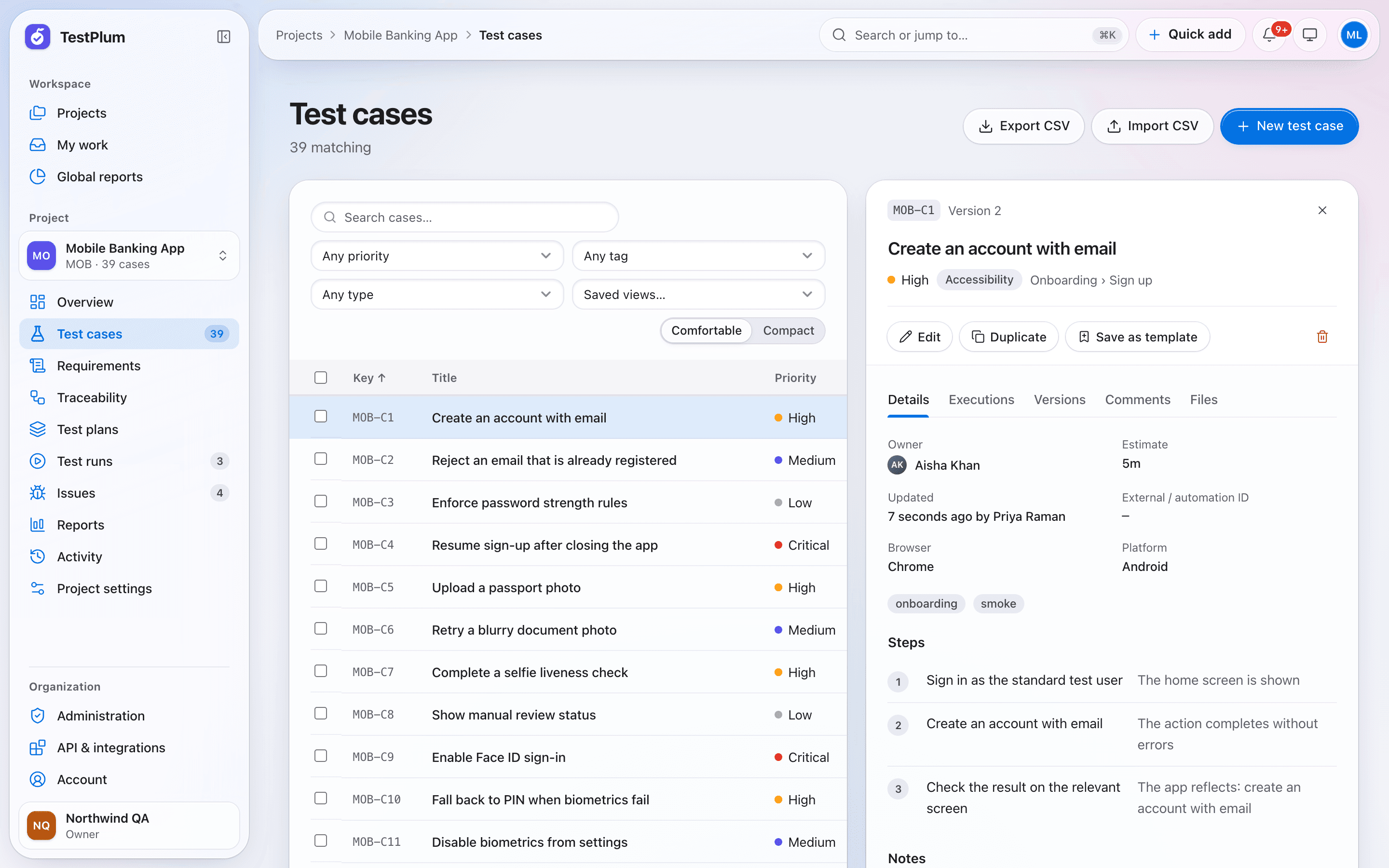
What you can do
Structured steps, versions with diffs, templates, custom fields, saved views and CSV import/export.
Structured steps
Each step has an action and an expected result, so testers record a pass, fail, block or skip per step instead of guessing which line failed.
Versions with diffs
Every save creates a version. Compare any two versions side by side, and see exactly what changed since a case was last executed.
Suites, sections and keys
Organise cases in suites with nested sections. Every case gets a short project key such as MOB-C12 that you can paste into commits and chats.
Templates and field sets
Start new cases from saved templates, and use field sets to show only the custom fields that matter for each kind of test.
Search, filters and saved views
Full-text search plus filters for priority, type, tag and owner. Save a filter set as a view and share it with the project.
CSV import and export
Import up to 1,000 rows at a time with validation that accepts all rows or none, and update existing cases by external ID. Exports are protected against spreadsheet formula injection.
How it works
Create a suite
Group related cases, then add sections for features or screens.
Write steps
Add actions and expected results; press ⌘↵ to insert the next step without leaving the keyboard.
Tag and assign
Set priority, owner and tags, or fill custom fields defined by your admin.
Reuse
Clone a case, save it as a template, or bulk-move and re-prioritise many cases at once.
Test case management: frequently asked questions
Can I import my existing test cases?
Yes. TestPlum imports CSV files of up to 1,000 rows per upload. The import is validated first and applied all-or-nothing, and rows with an external ID update the matching case instead of creating a duplicate.
Does TestPlum keep a history of test case changes?
Yes. Every save creates a new version, and you can diff any two versions. Test runs snapshot the case version they were created with, so past results always refer to the steps that were actually executed.
Can I add my own fields to test cases?
Yes. Admins define custom fields and group them into field sets, so each type of case shows the fields that apply to it. Custom fields are included in CSV import and export.
More of TestPlum
Test runs and execution
Run snapshots, assignment, step results with keyboard shortcuts, append-only history, burndown and retests.
Learn moreRequirements and traceability
Requirement coverage, derived status, orphan detection and an exportable traceability matrix.
Learn moreReports and release readiness
Readiness verdicts, explainable risk scores, flaky-test detection, workload and a configurable report builder.
Learn moreSee your release readiness in minutes
Create a workspace, add a project and record your first run. Everything on this site is in the product today.