Test runs and execution
Test execution that is fast to record and impossible to rewrite
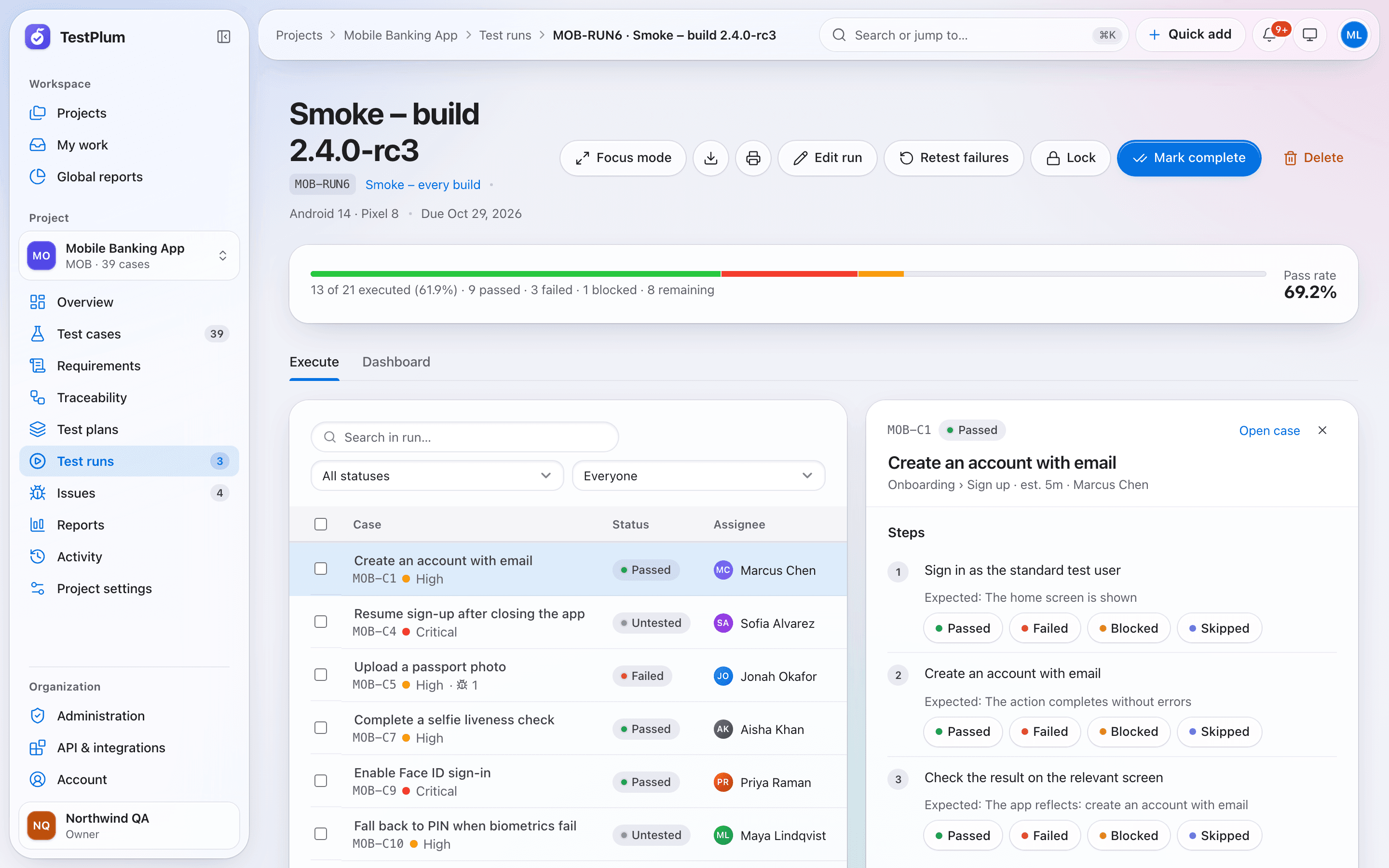
A test run in TestPlum is a snapshot of selected test cases that a team executes for a build, release or environment. Testers record pass, fail, blocked or skipped per step with single key presses, results are append-only, and the run dashboard shows completion, pass rate, workload and a burndown against the due date.
What you can do
Run snapshots, assignment, step results with keyboard shortcuts, append-only history, burndown and retests.
Snapshots you can trust
A run copies the case versions it was created with. Later edits to a case never change what was tested, and you refresh the snapshot only when you choose to.
Keyboard-first execution
Press 1–9 to record a result, move between cases without the mouse, and add notes, elapsed time and step outcomes as you go.
Append-only results
Results are never overwritten. A correction is a new result, so the full history of every case in every run stays auditable.
Assignment and workload
Assign cases one by one or in bulk, and see each tester's remaining work on the run dashboard.
Plans and selections
Save reusable test plans that select all cases, cases matching a filter, or a hand-picked list, then start a run from the plan in one click.
Retest failures
Start a follow-up run of only the failed and blocked cases. Lock a run to freeze it, then mark it complete or reopen it.
How it works
Choose the cases
All cases, a saved filter, specific cases or a test plan.
Assign testers
Split the work and set a due date to get an ideal burndown line.
Execute
Record step results with number keys; file an issue straight from a failure.
Close out
Retest failures, export the results to CSV, print a report and mark the run complete.
Test runs and execution: frequently asked questions
What happens to a test run if someone edits a test case?
Nothing changes in the run. Runs snapshot the case versions they were created with. TestPlum flags that the case changed, and you can refresh the snapshot explicitly when you want the new steps.
Can testers only see the cases assigned to them?
Yes. Project roles are configurable, and a tester role without the permission to view all cases only sees and executes the run cases assigned to them.
How is run progress calculated?
Completion is the share of run cases whose current status is final. Pass rate is passed cases divided by cases with a final status. The burndown counts cases without a first final result on each day.
Related guides
What is test management?
Test management is how a team plans, writes, runs and reports on software tests. Learn the core building blocks, the metrics that matter and how to choose a tool.
Read the guideRelease readiness: six checks that tell you if a build can ship
A release readiness checklist for QA teams: scope, completion, pass rate, critical failures, open critical defects and verified requirements.
Read the guideRisk-based testing: prioritise the tests that matter most
Risk-based testing orders tests by the likelihood and impact of failure. A transparent scoring model built from priority, recent failures, changes and coverage gaps.
Read the guideMore of TestPlum
Test case management
Structured steps, versions with diffs, templates, custom fields, saved views and CSV import/export.
Learn moreRequirements and traceability
Requirement coverage, derived status, orphan detection and an exportable traceability matrix.
Learn moreReports and release readiness
Readiness verdicts, explainable risk scores, flaky-test detection, workload and a configurable report builder.
Learn moreSee your release readiness in minutes
Create a workspace, add a project and record your first run. Everything on this site is in the product today.